
Whether you’re applying for an undergraduate programme, a postgraduate degree, or a short learning course at the University of South Africa (UNISA), staying informed about your application is essential. A UNISA Status Check lets you track the progress of your application, showing if it’s under review, accepted, declined, or requires additional documents. This guide provides clear, up-to-date information to ensure you always know where your application stands.
Track UNISA Application Status 2026
Checking the status of your UNISA application is a straightforward process facilitated through the MyUNISA login portal. This portal serves as a centralized hub for students to manage their academic journey, including status tracking, course registration, and access to important resources.
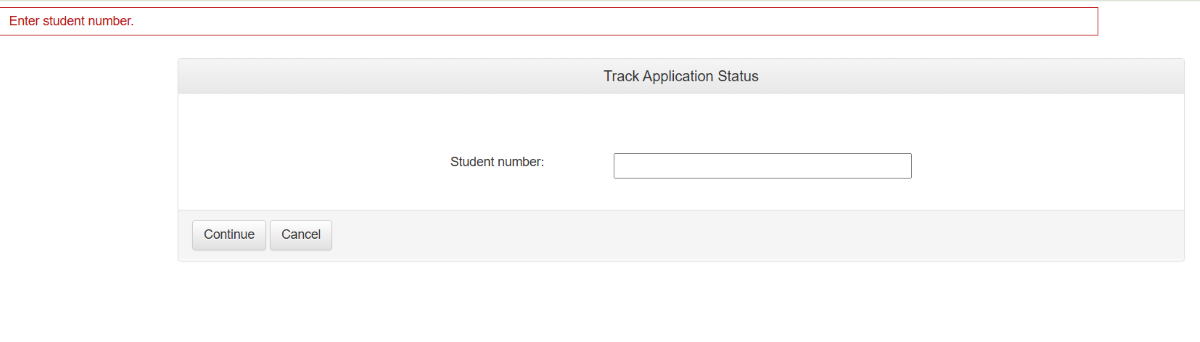
- Visit the Official Website
Go to myadmin.unisa.ac.za, enter your student number, and click on the Continue button.
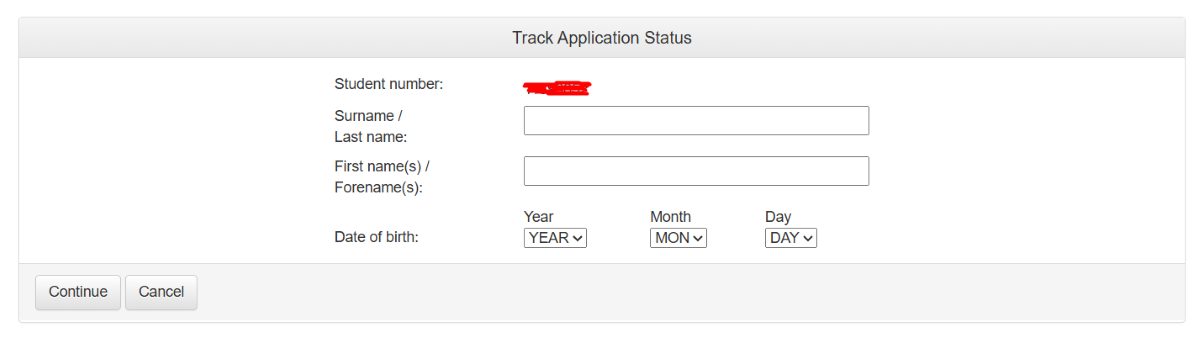
- Enter Personal Details:
After that, you can provide your personal information, like your surname, Last name, and other required details.
- Take Necessary Actions
Based on the status displayed, you may need to complete certain steps. For instance, if documents are requested, you must submit them through the specified channels.
- Regularly Monitor Updates
Perform a UNISA Status Check regularly to stay informed about any changes or updates. This helps you remain proactive and address requirements on time.
By consistently following these steps and keeping track of your progress, you can ensure a smooth and well-informed experience throughout your UNISA admission journey.

UNISA Status Check Meanings
After the submission of the application, various statuses are displayed to the applicants. It is important to understand the statuses so that you take action accordingly. So let’s understand the statuses with meanings.
- Accepted
This status means that the application is successfully accepted. Now you can proceed to the next step.
- Application Received
This means that UNISA successfully received your application after submission.
- Awaiting Documents
It means that your application is submitted and some of the documents are missing that’s why your application is waiting for documents. Check for required documents and upload them. So your application moved from the awaiting Documents period.
- Application in Progress
It means that your application is submitted and UNISA is verifying your application. That’s why it is in progress.
Conditions Met
It means your application meets all the requirements and it is finalized too.
- Rejected
This means your application is rejected due to some issue. Rejection reason is also defined so understand it and apply for reconsideration.
Other Methods to Check Your UNISA Application
Tracking your UNISA application is essential to stay informed about its progress and avoid missing deadlines.
myUnisa Student Account
- Once your application is accepted, you can log in to myUnisa.
- Your dashboard shows not only your registration status but also messages, required documents, and deadlines.
- For continuing students, myUnisa provides real-time notifications about any outstanding items.
3. Email Notifications from UNISA
- UNISA sends updates about application progress directly to your registered email.
- You’ll be informed if additional documents are required or if your status changes.
- Check your inbox (and spam folder) regularly to avoid missing important notifications.
What to Do If Status Shows?
Once you check your UNISA application status, you might see different results. Each status has its own next steps, and knowing exactly what to do will help you avoid delays or missed opportunities.
Pending / In Progress
If your application remains Pending or In Progress for an extended period, it means UNISA has not yet completed processing.
- Make sure all documents were uploaded correctly and are legible.
- UNISA may request additional information before moving forward.
- If the status remains unchanged for several weeks, reach out via phone or email. Provide your student number, ID, and application details for faster resolution.
- High volumes of applications can slow processing, especially near deadlines.
Rejected
If your application shows Rejected, it means UNISA did not approve your admission for the chosen program.
- Some rejections specify missing documents, not meeting minimum requirements, or incorrect application details.
- If the rejection was due to missing or incorrect documents, contact UNISA to see if an appeal or re-submission is possible.
- Explore other programs or intake periods if the current one is not feasible.
How to Check Your UNISA Registration Status?
Checking your registration status follows the same process as checking your application and admission status.
You simply:
- Log in to the registration portal
- Enter your student number
- Review the displayed registration status
- Complete any required actions
Understanding XMO Meaning
XMO stands for “eXam Marks Online,” a platform designed to manage and display student assessment results. It integrates with Moodle and Sakai, automatically updating grades for assessments conducted on these systems.
Registration Process for UNISA
Follow these updated steps to successfully complete your registration process at the University of South Africa (UNISA):
Step 1: Find Your Qualification & Choose Your Modules
Confirm your admission and select the modules for your course, ensuring they align with the program requirements
Step 2: Calculate Your Fees
Use the fee calculator to estimate your tuition and additional charges, including optional services like study material delivery.
Step 3: Complete & Submit Your Registration
Log in to the registration portal, review your details, select modules, and submit your registration before the deadline.
Step 4: Pay Your Fees
Pay the required study fees through available methods (EFT, card, or bank deposit) and keep proof of payment.
Step 5: After Registration
Once registered, check your myUNISA portal for enrollment confirmation, access study materials, and stay updated on important information. You can also perform a quick unisa status check to confirm your registration progress.
Prospectus For UNISA
Prospective students can access detailed information on courses, admission requirements, fees, and study options at UNISA. The prospectus provides insights into undergraduate, postgraduate, and distance learning programs, helping students plan their academic journey. It also includes academic policies, support services, and important application deadlines for a smooth enrollment process.
Application Issues and Effective Solutions
Many UNISA applicants experience delays during the application process.
Understanding why these delays happen and how to address them can save time and reduce stress.
1. Missing or Incorrect Documents
Applications may remain “In Progress” if supporting documents are missing, incomplete, or incorrectly uploaded.
Solution:
Double-check all required documents before submission.
Keep scanned copies in clear formats (PDF or JPEG).
Confirm successful upload via the portal.
If a document is rejected, re-upload promptly and notify UNISA if necessary.
2. Late Submission of Application
Applications submitted after deadlines may take longer to process or be placed on hold.
Solution:
Submit applications as early as possible.
Monitor UNISA announcements for deadline extensions.
Keep proof of submission (email confirmations, screenshots).
3. High Volume of Applications
During peak periods (January–March or July), UNISA may take longer to process applications.
Solution:
Track your status regularly but remain patient.
Avoid contacting support multiple times; one follow-up after 2–3 weeks is sufficient.
4. System or Portal Issues
Technical issues on the UNISA portal may prevent status updates from showing or uploading documents.
Solution:
Use a desktop browser or incognito mode.
Clear cache or try a different browser.
If issues persist, report them to UNISA IT support.
5. Missing Student Number or Login Details
Without a student number, you cannot check your status or complete registration.
Solution:
Use UNISA’s “Retrieve Student Number” option.
Keep all login details safe and up-to-date.
Contact support if retrieval fails.
How To Access Mylife UNISA Email?
UNISA gives every student a myLife email login, which is the main way the university communicates with its students. This email is used to send important messages like official notices, exam schedules, results, and other essential information efficiently.
Follow these steps to access your MyLife UNISA Email;
- Visit the UNISA official website by this link; https://my.unisa.ac.za/portal or open by searching UNISA through Chrome.
- At the top, click on “Claim UNISA Login,” and you will be directed to a new page.
- Enter your “Student Number” and press the “Continue” button.
- Enter your personal information like surname, full name, date of birth, Nation ID number, passport number etc.
- Press the “Continue” button and accept all the terms and conditions.
- Then press the “Acknowledged” button.
- Now your “myUnisa” and “myLife email” account password display on the screen.
- Now access your myLife email by this link: http://mylife.unisa.ac.za
- Now enter your myLife email like [email protected] and press the “Next” button.
- You are successful Sign in to your myLife email account.
Myexams UNISA Login Process
Students can log in to myexams at UNISA to access their exams. From there, they can perform a UNISA sttaus check to view their exam details and access all essential resources efficiently.
Follow these steps to log in to your UNISA myExams;
- Open the official Web of UNISA by searching on your device Chrome or directly go to UNISA Web by this link: https://www.unisa.ac.za/
- Now click on “myUnisa” and scroll down. In the “Important Links” tab, click on “myExams” or directly open the exam page by this link https://myexams.unisa.ac.za/
- According to your exam timetable, click on the date to access your exam schedule.
- You are directed towards the modules of your exams. Access the module assessment page by tapping on the module.
- Input your UNISA username and password. Then press the Login button.
- Click on myExam and choose the module of your exam.
- On the module page, choose MCQs or assessment and complete it.
Contact Details
UNISA, which stands for the University of South Africa, gives students different ways to get help with questions and support. Whether you need general information, help with UNISA’s online platforms or guidance with administrative stuff, you can use this table to UNISA contact the right department at UNISA via 0800 00 1870
Benefits of Studying at UNISA
UNISA is one of the largest open-distance learning sources in South Africa. Here are the few benefits of studying at UNISA;
-
Flexibility: UNISA students can study at any time according to their schedules. UNISA students are not like the full-time enrolled students, they can study with the work.
- Wide Range of Programs: UNISA offers a comprehensive array of undergraduate and postgraduate programs across various fields of study. This diversity enables students to pursue degrees that align with their interests and career aspirations.
- Affordability: UNISA’s tuition fees are generally more affordable compared to many traditional universities. This affordability makes higher education accessible to a broader demographic, including part-time students and those balancing work and study.
- Quality Education: Despite its affordability, UNISA maintains high academic standards and is recognized internationally for the quality of its education. Its programs are accredited and respected in academic and professional circles.
- Supportive Learning Environment: UNISA provides robust student support services, including online libraries, academic counseling, and access to digital learning resources. A list of books for study is provided to the UNISA students according to the lecture. The study has to enter the code in the book to get the relevant material.
- Course Choices: UNISA provides various study choices from short courses, diplomas, and certificate courses to the 4-year degree program. Students can enroll in anyone they want.
UNISA students get multiple resources and benefits like the e-tutor, counselor and UNISA library access. Along with UNISA offers a wide variety of study disciplines to the students. These disciplines include management, law, human sciences, agriculture, environmental sciences, engineering and technology.
Frequently Asked Questions
What information do I need to check my UNISA status?
You’ll need your student number (if you have one), surname, first name(s), and date of birth.
Can I check my application status before UNISA issues a student number?
Yes. If you haven’t received a student number yet, you may still check status using your personal details, name and birth date will help the system locate your application.
How long does UNISA take to process applications?
For postgraduate programmes, applications submitted ahead of deadlines are typically reviewed between January and February, with outcomes released in the first week of March 2026.
The University of South Africa is the largest provider of long-distance education. Students can enroll and perform an unisa status check to stay updated on their progress and take the necessary actions. You can easily access your myLife email and log in to myExam without any hassle. If you encounter any issues, contact UNISA through their Helpline numbers based on your specific query.
Similar to checking your status for academic programs, the srdsassastatuscheck350.co.za ensures that applicants stay informed about the status of their social assistance.

- UNISA Toll Free Number, Email Address - December 16, 2025
- How To Recover UNISA Student Number? - December 11, 2025
- UNISA Extends Prof LenkaBula’s Tenure as Vice-Chancellor - December 11, 2025
Table of Contents